
If you need to renew your domain but can’t log in to your account, you can use the steps below as a temporary solution. This will give you enough time to either recover your login credentials or submit a Change of Contact form to regain full access to your account!
How Quick Renew Works:
If you want to renew your domain but you are unable to log in to your account, please follow the steps below.
Step 1.
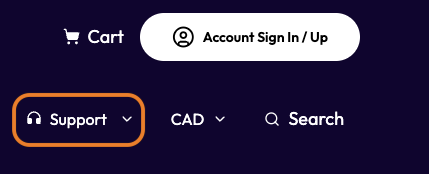
Go to your Rebel account and click "Support" in the top-right toolbar.
Step 2.
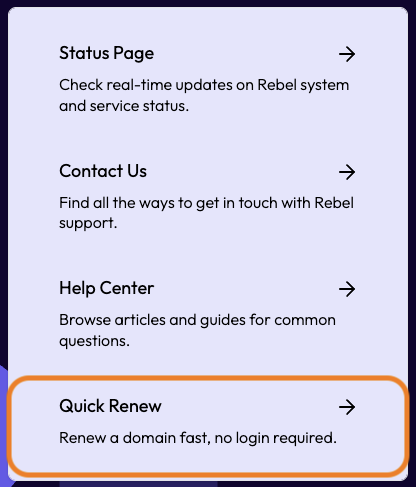
In the drop-down menu, you will see the option to "Quick Renew." Select this,
Step 3.
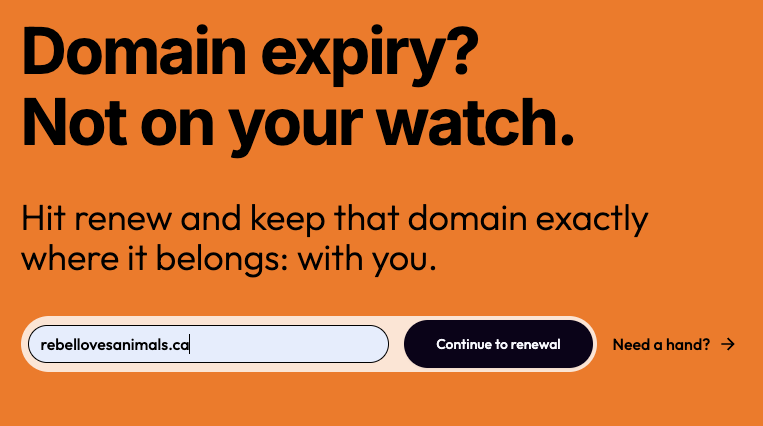
A search bar will appear; type in the domain you want to renew. Please ensure that the domain is registered with Rebel, or else it will not show up properly. Once you have typed it in, you will be able to select "Continue to renewal."
Step 4.
After searching the domain, you will see an area to fill out with your payment information, including the first and last name, card number, expiry date, and CVV. Once these fields are filled out please select Renew domain" You should
| Note: Our quick renew feature acts as a one-time payment for your domain's renewal. Your credit card details will not be saved to the account. A receipt and invoice will be generated; however, they are only accessible by logging into the account. |
Comments
1 comment
Would it be possible to have the information about domains that are ineligible for the quick renew feature such as domains that have expired or are in RGP status?
Thank you!
Please sign in to leave a comment.