
This article will take you through the following:
- What is HTTPS forwarding?
- Why HTTPS matters
- What you'll need before you start
- How to set up HTTPS forwarding
What is HTTPS forwarding?
HTTPS (Hypertext Transfer Protocol Secure) forwarding lets you redirect your domain to another website using a secure, encrypted connection. Unlike a standard redirect, HTTPS forwarding ensures that the connection between the visitor’s browser and your domain is protected, which helps build trust and avoids browser security warnings.
Why HTTPS matters
The main difference between HTTP and HTTPS is encryption.
HTTP transfers information openly between the browser and server.
HTTPS uses an SSL/TLS certificate to encrypt this communication, making it much harder for anyone to intercept or read the data.
Modern browsers highlight when a site isn’t secure, so HTTPS is now a basic expectation for most visitors.
What you’ll need before you start
A valid SSL/TLS certificate on the website you’re forwarding to. Without this, the redirect may lead to browser warnings.
Access to your DNS or domain settings to configure the forwarding.
The full destination URL (including
https://) where your visitors will be redirected.
How to set up HTTPS forwarding
Our platform now automatically connects your domain to HTTPS with just a click of a button. To forward your domain to a URL, please follow these steps:
Step 1.
Log in to your Rebel account, then select "Products" in the top-left corner. In the top toolbar, you will see "Domains”. Please select this.
Step 2.
For the domain you would like to edit, click on the "Manage" button on the right-hand side.
Step 3.
In the upper left, you will see the two words "Manage" and "DNS". Select the "DNS" tab.
Step 4.
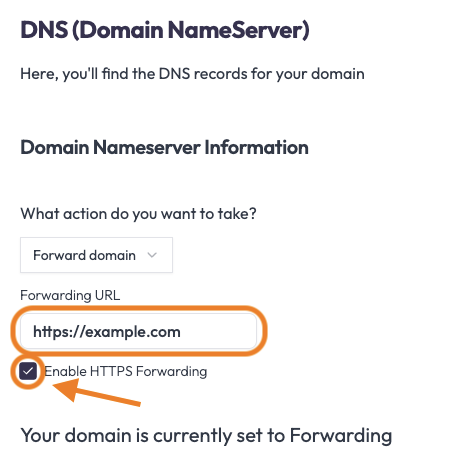
In the drop-down beneath Domain Nameserver Information, select "Forward Domain".
Step 5.
Enter the URL you wish to forward to in the box provided. To enable HTTPS forwarding for your domain, please select the box as needed.
Step 6.
Click "Save Changes" to the right of all of the information.
| Note: If you are switching the Nameserver Information from Use Third Party Hosting to Forwarding on our nameservers, these changes may take up to 24-48 hours to take effect due to DNS propagation, though we typically find it's closer to 6-12 hours. |
Comments
0 comments
Please sign in to leave a comment.